Book an Appointment
Call Largo Computer Repair at 727-350-1090
                   

(727) 350-1090

*


Largo Computer Repair has provided the best mobile computer repair in Largo, FL and the greater Tampa Bay Area since 1999. The term "mobile computer repair" means we come to you to resolve all your computer problems.

We repair laptops, desktops, PCs and Apple computers. One of our highly qualified staff will come to you, often the same day, to take care of all your repair needs.

Why not use the #1 rated company for computer repair in Largo, FL?

Computer Repair 4.9 / 5 stars from 306 reviews
Why use a computer tech when you can have a Largo based Computer Engineer? Mon-Sun 8:00am - 8:00pm

Call us at (727) 350-1090

Text us at (727) 350-1090

Email us your questions

Book an Appointment

"Jason did an awesome job at explaining all the questions that we had! He will be our go to computer guru from now on! We highly recommend him!!"
Largo Computer Repair 5 / 5 stars
"Ben was very professional, answered questions, offered advise pleasantly. I appreciated his assistance in securing my computer."
Largo Computer Repair 5 / 5 stars
"Great service - from the initial phone call and scheduling - very upfront on costs - and ease of biz. Showed up on time, with a 15 min courtesy call -- he was professional, knowledgeable and gave great advice. He replaced my hard drive and got me back up and running. I would recommend this service. I chose it b/c of all the positive online reviews - and I was not disappointed. Nice job!"
Largo Computer Repair 5 / 5 stars
"Great service today! Fixed all of my issues and was very helpful in making suggestions on products to fit my needs. Arrived on time and was pleasant and professional. I will call again!"
Largo Computer Repair 5 / 5 stars
"Excellent service, same day, actually same hour. 30 minutes and we were back working. A+"
Largo Computer Repair 5 / 5 stars

Who is Largo Computer Repair?

Largo Computer Repair is owned by Matt Karls, an Electrical Engineer and a Computer Systems Engineer. We are a team of computer professionals focused on Service and quality, all our work is guaranteed.

If you have any computer, technology or IT problem in Largo, FL we can fix it. We have been performing computer repair in Largo full time since 1999. Feel free to give us a call or text us at (727) 350-1090.

Largo Computer Repair's Computer Engineer

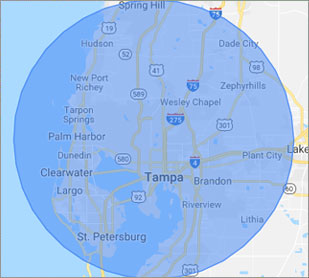
What is your Service Area for on-site Computer Repair?

Our primary on-site mobile service areas include the greater Tampa Bay Area and the Phoenix, Tucson, Las Vegas, San Diego, Salt Lake City, Denver, Dallas-Fort Worth and Orlando metro areas.

We provide remote and mobile computer repair in Largo, Apollo Beach, Bayonet Point, Brandon, Carrollwood, Cheval, Citrus Park, Clearwater, Dunedin, East Lake, East Lake-Orient Park, Egypt Lake-Leto, Elfers, Gibsonton, Gulfport, Holiday, Hudson, Jasmine Estates, Keystone, Lake Magdalene, Land O' Lakes, Largo, Mango, New Port Richey, Northdale, Oldsmar, Palm Harbor, Palm River-Clair Mel, Pinellas Park, Plant City, Riverview, Ruskin, Safety Harbor, Seminole, Shady Hills, Spring Hill, St. Pete Beach, St. Petersburg, Sun City Center, Tampa, Tarpon Springs, Temple Terrace, Thonotosassa, Town 'n' Country, Trinity, University, Valrico, Wesley Chapel, Westchase and Zephyrhills.

Our on-site Computer Service Area

What should someone expect that hires you for Computer Service?

Our mission is to fully resolve your computer problems quickly and affordably. If you want a Computer Engineer that can fix all of your computer problems instead of a computer tech, a computer geek, a technician or a computer guy that can only fix some of your problems; call us at (727) 350-1090.  

What types of Computer Services do you perform?

We service businesses and business clients in their homes, including:
 
  • Diagnose / repair hardware or software problems
  • Spyware, malware, trojan and virus removal
  • Setup wireless and small business networks
  • Laptop repair, PC repair and Apple repair
  • Hard drive data recovery

Largo Computer Repair Contact Information

Largo Computer Repair
(727) 350-1090

Largo Computer Repair is a Karls Technology company

* *
*
*
*
  *
* *


*
*
* * * * * * * * * * * * * * *
4.9 / 5 stars from 306 reviews

"My whole experience was great. Ken was personal as well as professional. He was quick and efficient. I would highly recommend."

Largo Computer Repair 5 / 5 stars

"Awesome and very fun to talk with!"

Largo Computer Repair 5 / 5 stars

"Jason was the epitome of professionalism. He was so knowledgeable as well as thorough. I would use him anytime. I am extremely happy and thank you very much."

Largo Computer Repair 5 / 5 stars

"The service was prompt and professional and the price was right! Thank you very much!"

Ahwatukee Computer Repair Service 5 / 5 stars
Best Antivirus Software of 2026: The Ultimate Guide to Cybersecurity Brands

In 2026, the digital threat landscape has shifted. We are no longer just fighting simple viruses; we are defending against AI-generated phishing, sophisticated ransomware-as-a-service, and complex identity theft. Choosing the right antivirus brand is no longer optional—it is the foundation of your digital life. At Karls Technology, we’ve analyzed the top-performing security suites of the […] The post Best Antivirus Software of 2026: The Ultimate Guide to Cybersecurity Brands appeared first on Computer Repair Blog.

Microsoft Fixes Bug on Windows 10

Microsoft has fixed an error that could cause the taskbar and desktop to disappear on Windows 10 computers. The same problem has been attributed by the corporation to the consumers’ gadgets freezing and not responding to input, according to Bleeping Computer. They also share that the affected versions are 20H2, 21H1, 21H2, and 22H2. Make […] The post Microsoft Fixes Bug on Windows 10 appeared first on Computer Repair Blog.

Changing Default Browser on Windows 11

Changing your default browser on Windows 11 is really easy. Click on the Start menu, then go to Settings, then Apps, and finally Default Apps. Simply choose your preferred browser and click “Set default” to make it your default browser. Keep in mind your desired default browser is selected in both the HTTP and HTTPS […] The post Changing Default Browser on Windows 11 appeared first on Computer Repair Blog.

Guide to Antivirus Brands in 2024

Karls Technology’s Comprehensive Guide to the Best Antivirus Brands in 2024 In today’s digital age, cybersecurity is more critical than ever. With the increasing number of cyber threats, from malware and phishing attacks to ransomware and identity theft, having reliable antivirus software is a necessity. The market is saturated with numerous antivirus brands, each offering […] The post Guide to Antivirus Brands in 2024 appeared first on Computer Repair Blog.

Closing Windows with Shortcut

Pressing the Windows key + D instantly minimizes all open windows. By doing it this manner, you can avoid manually closing each window. To restore any minimized windows to their original position, hit the Win and D keys simultaneously. The desktop can be accessed by hitting the Windows key and the letter M. Apps like […] The post Closing Windows with Shortcut appeared first on Computer Repair Blog.

Disabling Game Mode on PC

By switching to “Game Mode,” your PC will be set up for maximum gaming performance. While this is fantastic during gameplay, it may cause your computer to run more slowly during other activities. You can improve your computer’s speed by disabling Game Mode. Even if you’ve never played a video game in your life, there’s […] The post Disabling Game Mode on PC appeared first on Computer Repair Blog.

Free Up Storage Easily

Free up some space on your hard drive. On Windows, you can utilize Storage Sense, while Mac users can access helpful tools within the Storage application. Windows also includes a tool called Disk Defragmenter for cleaning up disk fragmentation. Data that you can’t bear to lose should be moved to an external drive or cloud […] The post Free Up Storage Easily appeared first on Computer Repair Blog.

Multitask Using Task View

Having numerous virtual desktops might be very helpful if you only have access to a single monitor and are trying to do several tasks at once. In Windows 10, you can find this option in the Task View section. The Windows 10’s Task View feature allows you to use numerous programs at once in a […] The post Multitask Using Task View appeared first on Computer Repair Blog.

3 New Security Features Announced by Apple

Today, Apple anApple has been working hard to give users with more advanced methods of data protection, and the company recently announced the release of three new security features. iMessage Contact Key Verification Security Keys for Apple ID Advanced Data Protection for iCloud Learn more about these tools on the Apple website. For help with […] The post 3 New Security Features Announced by Apple appeared first on Computer Repair Blog.

Apple Says No to Increased Prices

Apple, TSMC’s largest customer, has reportedly rejected the supplier’s plans to increase chip prices in 2019. There will be a price increase of around 9% implemented by TSMC. The Taiwan Semiconductor Manufacturing Company (TSMC) produces all of Apple’s custom silicon chips. In order to preserve its premium and pass on increased expenditures to customers, the […] The post Apple Says No to Increased Prices appeared first on Computer Repair Blog.